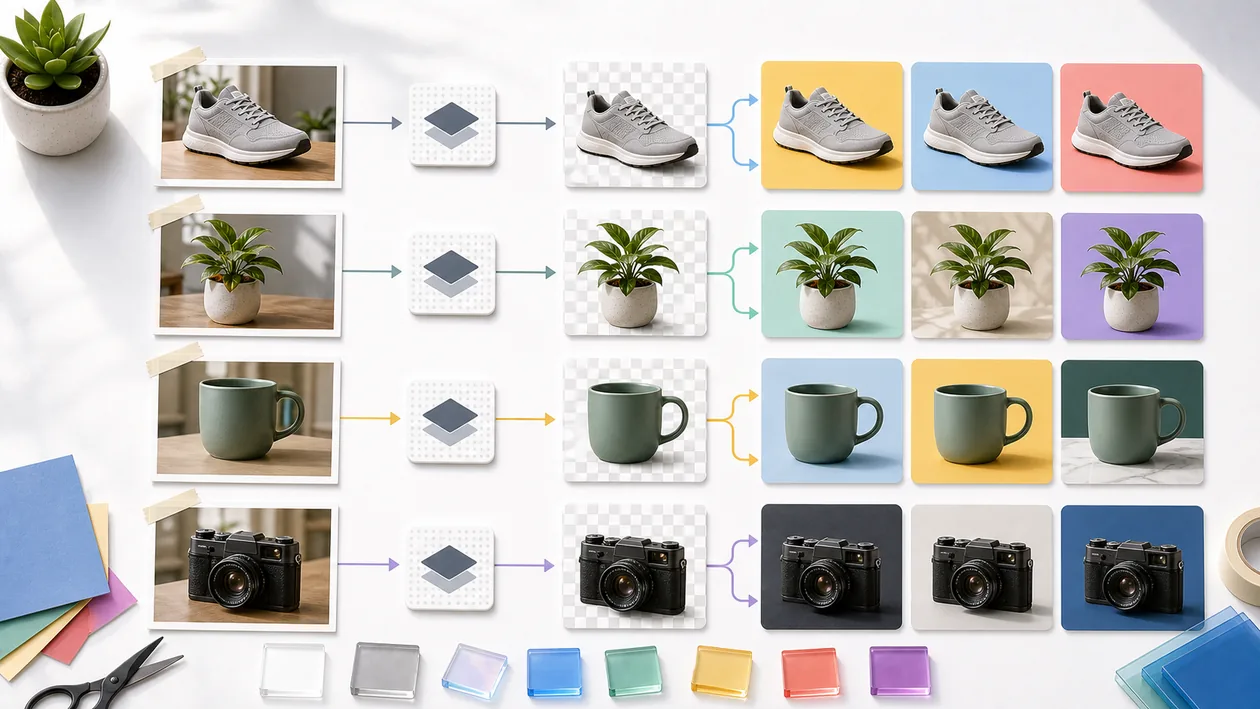
remove.bg is a specialized tool for automatically removing image backgrounds. It is especially useful when product photos, portraits, or social media visuals need to be cut out quickly without drawing masks manually.
The appeal lies in speed. A good cutout result saves minutes or hours, but with hair, transparent objects, or difficult edges, some manual cleanup is sometimes unavoidable.
Who is Remove.bg for?
remove.bg is suitable for e-commerce, social media, creators, small marketing teams, marketplace images, and fast design workflows. For high-end retouching, large campaigns, or complex compositing, manual control in Photoshop or Affinity makes sense.
Typical use cases
- Cut out product images for shops or marketplace listings.
- Prepare portraits for team pages, presentations, or social posts.
- Replace backgrounds for banners, thumbnails, or ads.
- Process many simple cutouts faster than manually.
- Reuse cutout PNGs in Canva, Figma, or design tools.
What really matters in day-to-day work
In day-to-day work, remove.bg is a classic time saver. Even so, every result should be checked briefly at 100 percent: hair, shadows, glasses, product edges, and white objects are the usual suspects.
For consistent brand visuals, it is worth standardizing light, shadows, and background style after the cutout. Removing the background alone does not yet make a strong product image.
Key features
- Automatic background removal for images.
- Download cutout subjects, often as PNG.
- Background replacement or simple editing depending on the plan.
- Batch or API usage depending on the plan.
- Integration into design and e-commerce workflows.
Pros and limitations
Advantages
- Very fast for simple to medium-complexity cutouts.
- Low barrier to entry with no image editing knowledge required.
- Good for product and social media workflows.
Limitations
- Difficult edges and transparent objects need review.
- Confidential or personal images should not be uploaded blindly.
- Background removal alone does not replace professional image editing.
Workflow fit
remove.bg works well as an early step in the design process: upload the image, check the cutout, refine the edges, add shadows or a background, and test it in the target context. For many images, a sample QA pass should be planned.
For product images, the target background should always be checked after the cutout. An edge that looks good on white can suddenly fray on color like a badly cut carpet.
Privacy & data
Images may contain personal or confidential information. Before uploading, rights, consent, and privacy conditions should be checked, especially for customer images or employee images.
Pricing & costs
remove.bg typically offers free tests and paid credits or plans for higher resolution, volume, or API access. The cost makes sense when many cutouts are needed regularly. The pricing model listed in the dataset is: Freemium.
Editorial assessment
remove.bg is a very good specialist for quick cutouts. The workflow becomes professional when edge checking, rights, and the final image context are not forgotten.
A good first test for Remove.bg is therefore not a demo click, but a real mini workflow: cut out product images for shops or marketplace listings. If that works with real data, real roles, and a clear result, the next expansion step is worthwhile.
At the same time, the most important limitation should be stated openly: difficult edges and transparent objects need review. That friction is not a deal-breaker, but it belongs before the decision, not only in the frustrated post-purchase debrief.
Open frequently asked questions
FAQ
Is Remove.bg suitable for small teams?
What should a Remove.bg pilot look like?
Start with a bounded process, a small group and a clear success criterion. Check output quality, permissions and handovers before expanding the scope.
Which data should not be processed in Remove.bg without review?
Sensitive or confidential content should wait until contract terms, access, storage and deletion controls have been reviewed. Escalate uncertainty to the responsible privacy owner.
When is an alternative to Remove.bg the better choice?
Choose an alternative when the need is occasional, a required integration is missing, or administration and cost outweigh the practical benefit.
Yes, if the concrete use case is kept small enough and the team plans for maintenance realistically.
What should you pay attention to before using Remove.bg? Difficult edges and transparent objects need review. It should also be clear in advance who maintains the tool, which data is used, and how success is measured.
Does Remove.bg replace human work? No. Remove.bg can speed up or structure work, but decisions, quality control, and responsibility remain with the team.
Editorial cluster update June 2026
Remove.bg is a specialized image editing utility for background removal when speed matters more than a full design workflow.
It fits product images, social assets, presentations and quick cutouts. When layout, brand style and variants matter, broader design tools are usually better.
When Remove.bg fits well
Remove.bg is most useful when the workflow is already named and the team is not only looking for a tool name. For the Utildesk guide clusters, the practical questions are: which task is being prepared, which data is processed, who reviews the result and which alternative is more realistic in the same work context?
Limits and review points
Customer images, faces and product photography require rights, upload rules and manual review. Automatic cutouts almost always need visual checking.
Internal comparison points
Useful comparison points in the Utildesk catalogue are PhotoRoom, Canva, Adobe Express, Pixelcut. These links keep Remove.bg connected to its real cluster of alternatives, risks and workflow roles instead of treating it as a standalone listing.