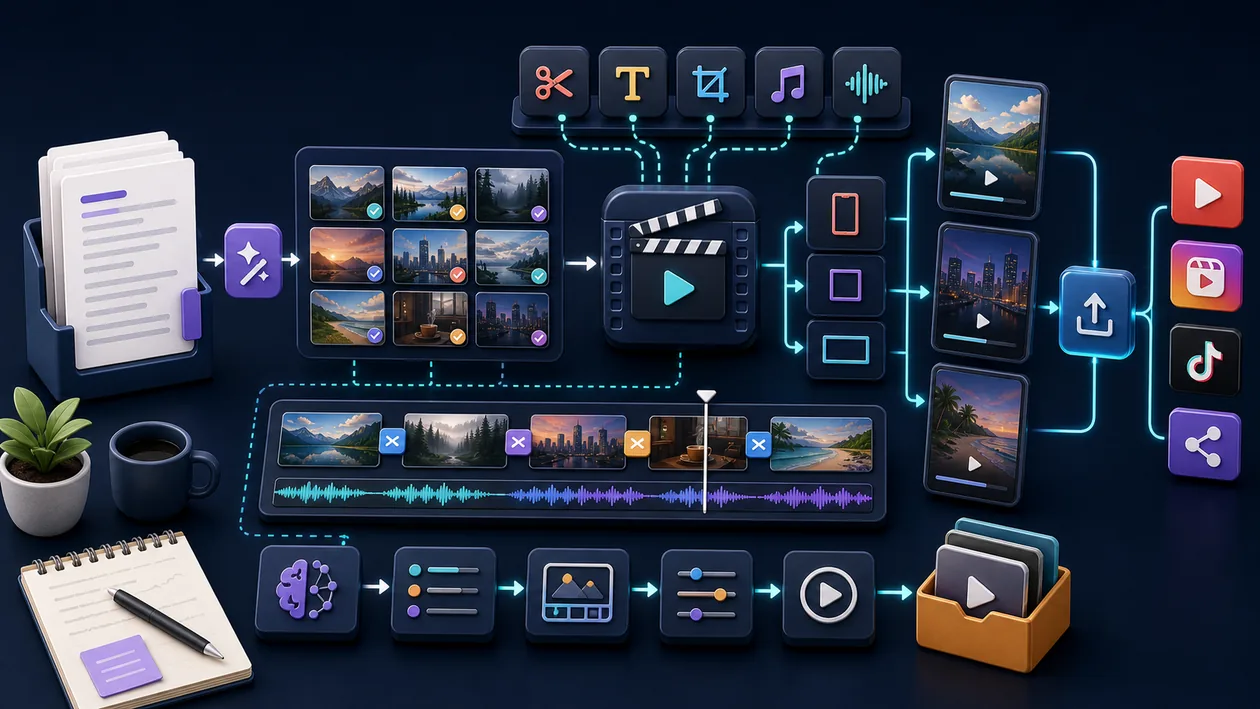
Pictory is a browser-based video workflow for teams that need to turn existing text, webpages, presentations, audio, or recordings into understandable videos. Its main value is not fully automatic filmmaking. It accelerates repeatable explainers, training pieces, and content-repurposing tasks by building scenes, matching visuals, syncing captions, and leaving the result editable in the video editor.
Who is Pictory for?
Pictory fits marketing, learning, and communications teams with a steady stream of source material but limited editing capacity. Individuals can also use it to make a first video from a blog post or webinar. It is not the right foundation for mobile-first production: Pictory's Help Center says the service is web-only and that creating and editing videos requires a PC or desktop. Complex film work, exact colour finishing, and demanding team post-production still belong in a specialised NLE.
Which inputs and features matter?
You can start with a script, URL, video, PowerPoint file, images, or audio. Text and URL workflows produce scenes with stock visuals, captions, timing, and optional narration. Uploaded videos are transcribed; filler words, pauses, and selected passages can then be edited through the text. AI Studio adds generated images and short video clips that can be placed into scenes. Brand kits, layouts, music, text overlays, and aspect ratios support repeatable formats, but they do not replace a documented visual system.
A practical workflow
- Define the audience, channel, language, aspect ratio, and permitted sources.
- Edit the source before import so each scene has one clear point; when starting from a URL, compare the generated script with the original page.
- Generate a first cut, then replace unsuitable stock visuals, overlong scenes, and unclear transitions.
- Correct captions, names, numbers, and specialist terms. Adjust the voiceover, music, brand kit, and amount of on-screen text.
- Watch the complete export on desktop and the target device. Keep source files and the approved master separate.
Operation, export, and collaboration
Pictory is a cloud service with automatically saved projects and browser-based editing. That makes recurring variants convenient, but the account, upload, browser, and export are part of the operating model. Do not design a mobile-only approval process, and test the intended browser with representative files. Before rollout, verify the actual plan's export quality, download options, team controls, video minutes, and voiceover quota. With several contributors, establish naming, approval status, and local storage for final exports.
Quality control and boundaries
The first result is a rough cut. Check automatically selected visuals for context, repetition, and subject accuracy; inspect captions especially for names, numbers, and technical language. Pictory's terms state that AI output may be inaccurate, incomplete, or biased. Measure value through turnaround time and rework rate for a defined format, not the speed of the first render. Pictory is a weaker fit when a project needs precise keyframes, complex sound design, deep colour control, or detailed multi-track finishing.
Privacy, rights, and governance
Upload only text, recordings, images, and music that your team is allowed to use. Pictory places responsibility for accuracy, legality, and third-party rights on the customer; its Terms also describe a limited licence needed to provide and process content and aggregated use for service improvement. The Privacy Policy says production data is processed and hosted in the United States. For customer or personal data, review the lawful basis, consent, retention, access, and deletion path before use. For sensitive interviews, an approved data path matters more than a convenient upload.
Pricing and operating cost
Pictory lists Starter, Professional, Teams, and Enterprise plans, along with a time-limited trial. Its Help Center describes pricing based on video minutes; AI credits, voiceover quotas, premium assets, user count, and export limits may also affect the calculation. Prices and quotas change, so estimate a real month of representative work: source volume, rendering and review time, required Getty or other media rights, and the number of versions.
Editorial Assessment
We recommend Pictory to teams that regularly turn blog posts, training material, webinars, or longer recordings into controlled short and explainer videos. It creates value when a well-edited source, a defined brand frame, and human review form one process. A local or specialised workflow is better for mobile shoots, demanding post-production, or tightly protected raw data. Run a pilot with three real formats and record rework rate before making it a standard production step.
Open frequently asked questions
FAQ
Can Pictory turn a blog post directly into a video?
Yes. A URL can be the starting point: Pictory extracts content, creates a script, and builds a scene structure. Compare that script with the source before publishing anything derived from it.
Is Pictory suitable for mobile video production?
Not as a complete mobile editing suite. Its Help Center describes Pictory as web-only and says that creating and editing require a PC or desktop. A phone may provide access, but it is not the intended replacement for the main editing screen.
Are automatic captions and voiceovers ready to publish?
No. They are useful drafts, but check pronunciation, names, numbers, timing, readability, and rights. Synthetic voices should also be labelled and approved according to the requirements of the project.
What data should not be uploaded without review?
Unreleased client material, confidential interviews, and personal recordings should enter the service only after you review the legal basis, consent, retention, access, and provider terms. Document the current Privacy Policy and contractual position before a team rollout.